Here’s a clear and easy difference between TTR and MTTR, especially useful for Incident/Problem/Service Management interviews:
—
✅ TTR vs MTTR — Key Differences
🔹 1. TTR (Time To Resolve)
Definition: The total time taken to fully resolve an incident or issue—from the moment it is reported until it is completely fixed.
Focus: Measures actual resolution time for a single incident.
Used For:
Tracking how fast teams close individual incidents
SLA reporting
Customer experience metrics
Example:
An incident raised at 10:00 AM and resolved at 11:30 AM ➡️ TTR = 1 hour 30 minutes
—
🔹 2. MTTR (Mean Time to Resolve / Repair / Restore)
Definition: The average time taken to resolve multiple incidents/issues.
Focus: Measures overall team performance and operational stability.
Used For:
Trend analysis
Operational KPIs
Process improvement
Example:
If 5 incidents took 20 hours total to resolve: ➡️ MTTR = 20 / 5 = 4 hours
—
🔥 Key Difference Summary (Interview Ready)
Metric Meaning Focus Level
TTR Time to resolve one incident Individual resolution Ticket-level MTTR Average time to resolve many incidents Team/process efficiency Overall performance
Understanding Major Incident Management in ServiceNow
Modern businesses run on IT services — applications, cloud platforms, networks, internal systems — all of which need to stay available for employees and customers to keep working without interruption. When something serious breaks, the impact can spread far beyond a single user or component.
Not every incident is created equal. Most can be resolved through the standard incident process, but some affect critical business services, large numbers of users, or key operations — and those need a faster response, tighter coordination, and clearer communication.
That’s exactly where Major Incident Management (MIM) comes in.
What Is Major Incident Management?
MIM is ServiceNow’s structured process for identifying and managing incidents with significant business impact. It extends standard Incident Management with capabilities built specifically for high-impact situations: major incident candidates, trigger rules, on-call scheduling, communication plans, collaboration tools, and dedicated workflows.
In short, MIM helps organizations:
Respond quickly to high-impact incidents
Bring the right teams and people together
Focus on restoring the affected service as fast as possible
What You Need Before Getting Started
You don’t need to be an advanced ServiceNow developer, but a few things will make the learning curve much smoother:
Requirements
Access to a ServiceNow instance with the Incident Management – Major Incident Management plugin activated
Appropriate roles/permissions to configure MIM features and administration settings
Helpful skills
Basic understanding of Incident Management and ITSM processes
Familiarity with ServiceNow tables, records, users, groups, and navigation
Working knowledge of Flow Designer and Workflow
Comfort with conditions, trigger rules, communication plans, on-call schedules, notifications, and assignments
What Does MIM Actually Do?
MIM coordinates people, teams, communication, automation, and on-call support around a single high-impact incident, rather than leaving each team to respond separately. Here are its core capabilities:
Major Incident Identification — Predefined criteria and Trigger Rules automatically flag incidents that may be significant.
Major Incident Candidates — A review stage where a potentially serious incident is proposed before officially becoming a Major Incident.
Major Incident Management — Once accepted, MIM provides a dedicated process to coordinate the response.
Major Incident Trigger Rules — Automatically identify incidents meeting specific conditions (e.g., affecting a critical service).
Alert Management Integration — Alerts from Event Management/ITOM can trigger Major Incident Candidates.
Major Incident Assignment — Routes the incident to the correct Assignment Group and on-call user.
On-Call Scheduling — Ensures 24×7 coverage through shifts, rosters, rotations, and escalation rules.
Communication Plans — Define what gets communicated, when, and to whom during a major incident.
Communication Tasks and Contacts — Individual communication activities and their recipients.
Collaboration — Teams coordinate via tools like Microsoft Teams while the Major Incident record remains the source of truth.
Service Operations Workspace — A centralized workspace for managing major incidents and configuring MIM settings.
Post-Incident Review (PIR) — Structured review of what happened and what can be improved.
Incident vs. Major Incident: What’s the Difference?
Regular Incident
Major Incident
Definition
An unexpected issue that interrupts or reduces an IT service
A serious service disruption with significant business impact
Handling
Managed per assigned Priority and SLA
Requires immediate attention to restore service ASAP
Ownership
Handled by the assigned support team
Coordinated under MIM, usually led by a Major Incident Manager
A high-priority incident (e.g., P1) doesn’t automatically become a Major Incident — that depends on business impact and whether a coordinated, cross-team response is required.
The MIM Plugin and Components
Plugin name: Incident Management – Major Incident Management
Plugin ID:com.snc.incident.mim
Activating it also enables Incident Communications Management, Incident Updates, and Task-Outage Relationship (if not already active).
Key modules: Overview, Create Major Incident Candidate, Create Major Incident, Candidates, Open, All — plus Trigger Rules and Properties under Administration.
Key UI Actions: Propose Major Incident, Promote to Major Incident, Reject Major Incident Candidate, Create Major Incident, Demote Major Incident, Preview PIR, Regenerate PIR Timeline, View Workbench.
The Three MIM Personas
Major Incident Manager — Manages the response team; can promote or demote Major Incidents; configures Major Incident Properties and Trigger Rules.
Communications Manager — Coordinates and manages stakeholder communication throughout the incident.
Major Incident Response Team — Performs the technical work to restore the affected service and supports the Major Incident Manager.
Major Incident Candidates: The Review Stage
An incident becomes a candidate either automatically (via a Trigger Rule) or manually (a user selects “Propose Major Incident”).
Once proposed, fields like Major Incident State, Proposed By, Business Impact, and Probable Cause become available for review. The Incident Manager or Major Incident Manager then decides:
Promote to Major Incident — if MIM is genuinely required
Reject Major Incident Candidate — if it can stay in the standard incident process
Major Incident Trigger Rules
Instead of relying on someone to spot a serious incident manually, Trigger Rules let ServiceNow evaluate incidents automatically. Configuration includes:
Name — purpose of the rule
Table Name — usually Incident [incident]
Trigger Conditions — what must be true
Action to Take — e.g., Propose Major Incident
Active — enabled or not
Execution Order — evaluation sequence
Rules run asynchronously and only evaluate when the Parent Incident field is empty, the Major Incident State isn’t already Proposed/Accepted, and the incident is Active. Predefined rules ship inactive by default.
Alert Management Rules
These connect ITOM alerts to the MIM process — the counterpart to Trigger Rules, which start from Incidents. A rule is configured across three areas:
Alert Info — name, active status, order, and multiple-rule behavior
Alert Filter — the conditions an alert must meet (with a Preview option to test against existing alerts)
Actions — typically Remediation Subflows, which can run automatically or manually to create a Major Incident Candidate or Major Incident directly
Rules run about 5 seconds after an alert updates (with the timer resetting on further changes) to avoid duplicate actions. An active rule needs both a filter and at least one action — otherwise it’s automatically deactivated.
Major Incident Properties
Found under Incident > Administration > Major Incident Properties, these control core MIM behavior:
Creation — whether promoting a candidate reuses the existing record or creates a new Major Incident (with the original becoming a child incident)
Communication/Email — which communication task types can use Compose Email, and default recipient placement (BCC by default)
Assignment — which group Major Incidents route to via the Major Incident Management Group property
Fields Copied — which attributes carry over from the child incident (e.g., Service, Configuration Item, Description)
Post-Incident Review — custom UI page association for exported PIRs
How Major Incident Assignment Works
Assignment depends on the current Assignment Group, the configured MIM Group property, whether On-Call Scheduling is active, and how the record was created:
If Assignment Group is empty, it’s auto-assigned to the configured MIM group
If On-Call Scheduling is active (with a defined shift and available user), the incident can go to that on-call person
On manual promotion, the promoting user can become the new Assigned To
On direct creation, the creator becomes the Assigned To
Communication Plans and Tasks inherit assignment from their source Major Incident when their own fields are empty
A small Service Desk incident, but a great reminder that IT Support is more than just fixing systems.
Recently, I handled an incident ticket where the user reported that the internet was not working on their system. Since it was an incident ticket with a 2-hour SLA, timely communication and structured troubleshooting were just as important as the technical fix.
Here’s how I approached it:
Step 1: Establish communication
– The contact number available in the ticket was unreachable.
– Instead of waiting, I immediately emailed the user requesting an alternate contact number and shared the IT Service Desk details.
– While waiting for the response, I placed the ticket on User Dependency to ensure the SLA was managed correctly and no unnecessary breach occurred.
Step 2: Prepare before visiting
– I carried a spare LAN cable and a LAN tester to rule out any physical connectivity issues before starting software troubleshooting.
Step 3: System diagnosis
– After reaching the user’s desk, I logged in using the administrator account.
– I verified network connectivity and confirmed the system was successfully connected to the domain.
– Hardware and network connectivity were working as expected, indicating the issue was likely profile-specific.
Step 4: Root cause analysis
– While investigating the user’s profile, I found that a required network-related service had been disabled.
– The service should normally remain enabled to provide internet access for the user’s profile.
Step 5: Resolution
– I restarted the system, during which pending Windows updates were installed.
– After the restart, I logged in as an administrator, restarted the required network services, and asked the user to sign back into their profile.
– Internet connectivity was restored successfully, and the user confirmed everything was working normally.
Key takeaway: Technical knowledge solves the problem, but communication, SLA management, preparation, and keeping the user informed are what create a great support experience.
Every incident is an opportunity to improve troubleshooting skills, customer communication, and confidence under time-sensitive situations.
? ITIL v4 vs ITIL (Version 5) — What every ITSM professional needs to know right now ? 3 things that stand out to me as an ITSM practitioner:
1️⃣ AI is no longer optional — it’s baked in ITIL v5 introduces the ITIL AI Capability Model (6C Model) — Creation, Curation, Clarification, Cognition, Communication, Coordination. AI governance is now a dedicated certification track.
2️⃣ “IT Infrastructure Library” is officially retired ITIL no longer stands for IT Infrastructure Library. It’s now positioned as a framework for digital product and service management — a significant philosophical shift.
3️⃣ Your ITIL v4 certification still holds full value This is an evolution, not a replacement. Both versions coexist. A bridge exam exists for v4 holders to transition. No panic needed — plan it strategically.
? My take: For those of us in Service Desk leadership, ITIL v5’s shift toward AI-native practices and digital product thinking is exactly where the industry was heading anyway. This isn’t a disruption — it’s validation that AI and automation belong at the heart of ITSM.
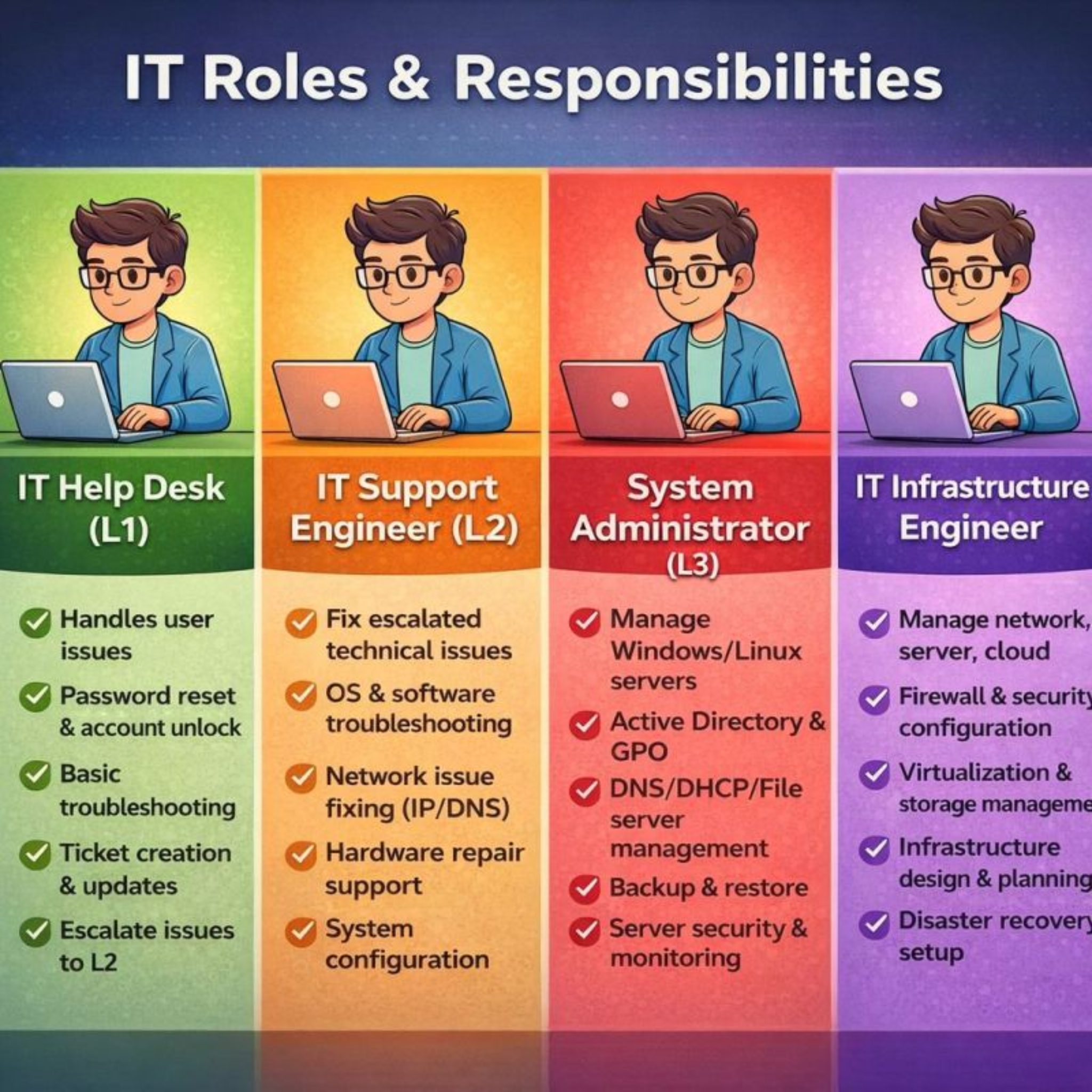
In modern organizations, IT operations are structured in layers to ensure efficiency, scalability, and reliability. Each level handles increasing complexity, from basic user support to strategic infrastructure planning. Below is a breakdown of the key IT roles and responsibilities typically found in structured IT environments.
1️⃣ IT Help Desk (L1) – The Front Line of Support
Primary Focus: User-facing support and basic issue resolution.
The IT Help Desk, often referred to as Level 1 (L1), is the first point of contact for employees experiencing technical issues. Their role is critical in maintaining daily productivity.
This role combines deep technical expertise with long-term planning and architecture.
How These Roles Work Together
IT operations function like a tiered ecosystem:
L1 handles volume and simple requests.
L2 solves more technical problems.
L3 manages servers and core services.
Infrastructure Engineers design and optimize the overall environment.
This layered approach:
Reduces downtime
Improves response times
Enhances security
Ensures scalability
Career Path in IT Support & Infrastructure
Many IT professionals begin in L1 roles and gradually move up:
Help Desk → IT Support Engineer → System Administrator → Infrastructure Engineer → Architect / IT Manager
Each step requires deeper technical knowledge, stronger troubleshooting skills, and broader system understanding.
Final Thoughts
A structured IT support model ensures efficient operations and clear responsibility boundaries. Whether you’re starting in Help Desk or aiming to become an Infrastructure Engineer, understanding these roles helps you plan your growth path strategically.
If you’re building your IT career, ask yourself:
Do you enjoy solving user problems?
Do you prefer deep technical troubleshooting?
Are you interested in designing entire systems?
Your answers will guide your journey through the IT ladder.
ITIL Version 5 is the latest iteration of the ITIL framework, officially launched in early 2026. This version builds on the foundation of ITIL 4 while introducing meaningful structural enhancements to better support modern digital product and service management. Unlike previous incremental updates, Version 5 reflects a deliberate evolution driven by practical feedback from service management professionals and the realities of AI-enabled business environments.
Core Evolution from ITIL 4
1. Unified Product and Service Lifecycle One of the most visible changes in Version 5 is the introduction of a formal Product and Service Lifecycle Model, which defines eight phases: Discover, Design, Acquire, Build, Transition, Operate, Deliver, and Support. This model explicitly unifies the management of digital products and services in a single lifecycle, encouraging alignment across development, delivery, and support activities. It moves beyond the service-centric value chain of ITIL 4 to reflect how organizations now build, operate, and evolve complex digital ecosystems.
2. AI-Native Design While AI and automation were acknowledged as important enablers in ITIL 4, ITIL Version 5 is AI-native by design. The framework embeds AI-aware guidance throughout its core concepts and includes specific AI Governance content to help organizations adopt AI responsibly, manage risk, and maintain ethical and transparent controls. This makes Version 5 more directly relevant for environments where machine-assisted decision support and automated workflows are integral to business operations.
3. Stronger Experience and Outcome Focus Experience is now a central concern. Version 5 places emphasis on customer experience, user experience, and employee experience as integral drivers of value, not just operational metrics. The shift encourages organizations to design practices around meaningful outcomes and stakeholder satisfaction, reinforcing value creation across all lifecycle stages rather than merely following process steps.
What Remains from ITIL 4
Despite these advances, Version 5 does not discard the core strengths of ITIL 4. Concepts such as value creation, continual improvement, and the importance of governance remain central. The familiar 34 practices from ITIL 4 continue to underpin guidance, though they are reframed to align with the unified lifecycle and digital product focus. Existing ITIL 4 certifications remain valid and can be used as prerequisites for Version 5 modules, with courses like a Foundation Bridge available to ease the transition.
Why Version 5 Matters
ITIL Version 5 reflects the reality that most organizations no longer operate with purely IT-centric, siloed service delivery models. Instead, they manage integrated digital products and services supported by automation and AI, where business value, experience, and adaptability are essential. By bringing product and service management together, embedding AI governance, and emphasizing measurable outcomes and experience, Version 5 aims to help organizations remain resilient and competitive in fast-changing environments.
ITIL started as a simple guide for managing IT services and has grown into a complete framework that helps organizations deliver value to their customers. Let’s look at how it has evolved over time.
Where ITIL Came From
Back in the 1980s, the UK government needed a better way to manage their computer systems. They created ITIL as a collection of guidelines to make IT services more reliable and cost-effective. The main idea was simple: if you follow standard procedures, you’ll get better results.
Soon, companies outside the government started using ITIL too. They liked that it wasn’t tied to any specific vendor and gave them a clear roadmap for running their IT departments.
ITIL Version 2: Focusing on Processes
Around 2000-2001, ITIL version 2 came out. This update made things much clearer by organizing everything around specific processes. It covered important areas like:
Handling incidents when things go wrong
Fixing underlying problems
Managing changes to systems
Keeping track of what you have
Rolling out new releases
These processes were split into two main groups: service support and service delivery. This made ITIL much easier for organizations to understand and put into practice.
ITIL Version 3: Thinking About the Full Journey
In 2007, ITIL version 3 introduced a new way of looking at services. Instead of just focusing on individual tasks, it showed how services move through different stages of life:
Strategy – Planning what services you need
Design – Figuring out how to build them
Transition – Moving them into production
Operation – Running them day-to-day
Continual Improvement – Making them better over time
This version described 26 different processes across these five stages. It helped organizations see the bigger picture and connect their IT work to their business goals.
ITIL 4: Designed for Today’s Digital World
ITIL 4 launched in 2019 with major updates to fit modern technology. The world had changed – companies were now using cloud computing, Agile methods, and DevOps practices. ITIL needed to catch up.
The biggest change is that ITIL 4 focuses on creating value together with customers, not just delivering services to them. It recognizes that different teams work in different ways, and that’s okay. Whether you’re using Agile, DevOps, Lean, or traditional methods, ITIL 4 can work alongside them.
Moving from Lifecycle to Value Chain
ITIL version 3 showed services moving through stages in order, like a production line. ITIL 4 takes a more flexible approach with something called the Service Value System.
At the center is the service value chain, which has six main activities:
Plan
Improve
Engage
Design and transition
Obtain/build
Deliver and support
The key difference is that these activities don’t have to happen in a fixed order. Teams can mix and match them based on what they need, making it easier to work quickly and adapt to changes.
From Processes to Practices
ITIL version 3 had 26 processes that told you exactly what to do. ITIL 4 changes this to 34 “practices” – a broader concept that includes not just workflows, but also the people, tools, and information you need.
These practices fall into three categories:
General management (like strategy and risk management)
Service management (like incident and problem handling)
Technical management (like deployment and infrastructure)
By calling them practices instead of processes, ITIL 4 gives organizations more freedom to adapt things to their own situation while still achieving the same goals.
Why These Changes Matter
The shift from ITIL 3 to ITIL 4 reflects how much technology has changed. Companies don’t just run simple applications anymore – they manage complex systems with cloud services, APIs, and third-party platforms.
ITIL 4 recognizes this reality. Instead of giving rigid instructions, it provides a flexible framework that helps organizations deliver great experiences to their customers. It works with modern methods like Agile and DevOps rather than against them.
For anyone working in IT, ITIL 4 is about enabling good outcomes and happy customers, not just following procedures. It gives you the tools to build services that can change and grow as your business needs evolve.
Now, most recently we have ITIL5 in market, which is majorly focused on AI Governance. What do you things are the changes in ITIL5 as compared to ITIL4.
Most companies don’t fail at ITIL.
They fail at discipline.
ITIL is simple:
• Incidents → Restore service fast
• Problems → Stop repeat failures
• Changes → Reduce risk
• SLAs → Protect customer trust
But here’s what actually happens:
❌ Incidents closed without root cause
❌ Emergency changes every week
❌ SLAs tracked only during audits
❌ Post-incident reviews skipped
ITIL doesn’t fail.
Leadership without accountability fails.
If your Problem Management isn’t reducing repeat incidents,
you don’t have ITIL — you have ticket management.
As a Service Delivery professional, I measure success in:
✔ Reduced MTTR
✔ Fewer repeat incidents
✔ Fewer emergency changes
✔ Happier business stakeholders
Frameworks don’t deliver value.
Execution does.